
SwiftUI’s Text has a default behavior: when the final line of a paragraph is left holding a single stranded word or character, it proactively pushes the complete word group from the preceding line down to join it, so that nothing is left standing alone. This bit of thoughtfulness is right most of the time, but it comes at a cost — the preceding line may be left with a wide gap. In narrow containers, or in mixed Chinese-English typesetting, that can end up disrupting the balance of the paragraph rather than preserving it.
The trouble is that UIKit lets developers switch this strategy off through NSParagraphStyle, while SwiftUI exposes no public interface for it at all. This article uncovers an API that has existed in SwiftUI for years yet has never been made public — avoidsOrphans — and hands that control back to developers.
This article uses undocumented SwiftUI ABI. It is suited to research, verification, and internal tooling, and should not be treated as a formal API whose compatibility Apple has committed to.
What an Orphan Is, and What SwiftUI Does About It
An orphan is a lone word or character that occupies the final line of a paragraph by itself. In the image below, for instance, the last Chinese character “者” sits alone across an entire line.
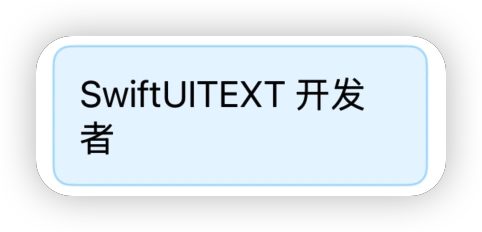
A note on terminology: in typography, an orphan usually refers to the first line of a paragraph left stranded at the bottom of a page or column, while a widow is the last line of a paragraph pushed to the top of the following page. The case of a final line holding only a word or two is more often called a runt. Apple settled on the word orphan in its naming, and this article follows that usage.
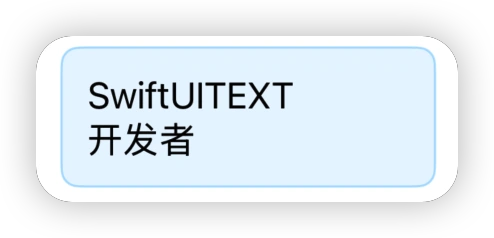
In UIKit, developers can adjust the line break strategy through NSParagraphStyle.LineBreakStrategy.pushOut. With pushOut removed, the line breaking looks like this:
SwiftUI adopts the .standard strategy by default, and .pushOut is part of it. When the final line would otherwise be left with a single stranded word, the text system moves the preceding complete word group down along with it. The orphan is avoided — but the line above is now left with a conspicuous gap:
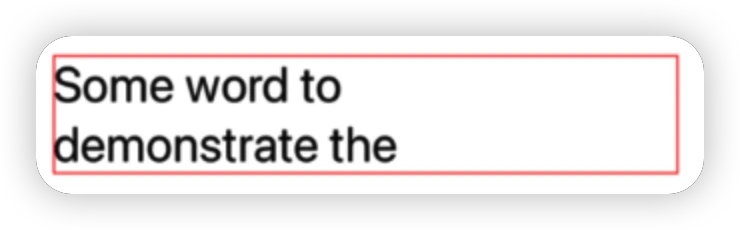
In a narrow container, that whitespace is often more jarring than the orphan itself. And SwiftUI offers no means of turning it off.
Text + NSAttributedString: A Dead End
Since NSAttributedString supports paragraph styles, could we remove .pushOut from .standard first, convert the result into a Swift AttributedString, and hand that to Text?
let paragraphStyle = NSMutableParagraphStyle()
paragraphStyle.lineBreakStrategy =
    .standard.subtracting(.pushOut)

let source = NSAttributedString(
    string: content,
    attributes: [
        .font: UIFont.preferredFont(forTextStyle: .body),
        .paragraphStyle: paragraphStyle
    ]
)

let attributed = try AttributedString(
    source,
    including: \.uiKit
)

Text(attributed)
Unfortunately, Text does not honor the lineBreakStrategy we set. It reconstructs the paragraph style from the current EnvironmentValues and writes it in, overwriting whatever configuration was passed in from outside:
attributes[.kitParagraphStyle] = properties.paragraph.style(
    environment: environment
)
The conclusion: if you want to customize lineBreakStrategy in SwiftUI, you generally have to retreat to wrapping a UILabel or another TextKit view. Paying that price for a single line-breaking rule is plainly uneconomical.
SwiftUI Has the Capability — It Simply Isn’t Public
In a conversation with Kyle Ye, a developer on OpenSwiftUI, he told me that SwiftUI has in fact possessed this capability for years; it has just never been opened up. He has exposed it in OpenSwiftUI.
Following the leads he provided, I ran my own check and confirmed the following:
- The exported symbol table of SwiftUICore contains both
View.avoidsOrphans(_:)andEnvironmentValues.avoidsOrphans. - These symbols have been present in the system binaries since iOS 16.x. That means the capability dates back at least to the iOS 16 era, rather than being a hollow declaration added in a recent SDK.
So — can we put it to use in our own projects?
Calling avoidsOrphans in a Project
The module interfaces Apple ships with the SDK have this declaration stripped out, so the following approach won’t work:
@_spi(Private) import SwiftUIWhat we actually need to do is supply the compiler with a declaration, and make that declaration emit exactly the same ABI symbols as the system’s SwiftUI.
Building an ABI View of the Module
Create a Modules folder in the project root and add SwiftUI_SPI.swiftinterface:
// swift-interface-format-version: 1.0
// swift-module-flags: -enable-objc-interop -enable-library-evolution -swift-version 5 -module-name SwiftUI_SPI -module-abi-name SwiftUI
import Swift
@_exported import SwiftUI

@available(iOS 16.0, macOS 13.0, tvOS 16.0, watchOS 9.0, visionOS 1.0, *)
extension SwiftUI.View {
    public func avoidsOrphans(_ flag: Swift.Bool) -> some SwiftUI.View
}
The two module names are the crux of the matter:
-module-name SwiftUI_SPI: the name this interface is imported under in source code, which is why the call site writesimport SwiftUI_SPI.-module-abi-name SwiftUI: instructs the compiler to emit symbol references under the identity of the SwiftUI module, allowing the linker to locate the real implementation inside the system’s SwiftUI / SwiftUICore.
@_exported import SwiftUI then ensures that any source file importing SwiftUI_SPI also sees the ordinary SwiftUI API.
This formulation is modeled on the
SwiftUI_SPI.swiftinterfaceused in the OpenSwiftUI examples to reach the system implementation. It leans on the Swift compiler and the existing system ABI: it modifies no original files in the Xcode SDK, and alters no signing, sandboxing, or system entitlements.
Incidentally, EnvironmentValues.avoidsOrphans appears in the symbol table as well, and in theory a declaration could be supplied for it the same way. But an environment value involves getters and setters along with internal key types, which makes the declaration both costlier and more fragile. The View modifier already covers the overwhelming majority of scenarios, so this article declares only the latter.
Configuring Xcode
- Create a physical folder named
Modulesin the directory containing the Xcode project, and placeSwiftUI_SPI.swiftinterfaceinside it. - The file should neither be added to Compile Sources nor copied into the app bundle.
- In Build Settings, locate Swift Compiler - Search Paths → Module Import Paths (the build setting is named
SWIFT_INCLUDE_PATHS). - Add the directory containing
SwiftUI_SPI.swiftinterfaceto Path, keeping$(inherited)in place. - Set the Deployment Target to iOS 16 or later.
Once that’s configured, you can use it:
import SwiftUI_SPI

struct ContentView: View {
    var body: some View {
        Text("SwiftUITEXT 开发者")
            .frame(width: 150)
            // SwiftUI defaults to true; false removes the pushOut strategy
            .avoidsOrphans(false)
    }
}
If Xcode still reports that it cannot find the module, run Clean Build Folder first, and if necessary clear the project’s Derived Data so the compiler regenerates its module cache.
Does the Project Need Any Other Adjustments?
No — the changes above have no global consequences.
A .swiftinterface is a textual module interface intended to be read by the compiler. At build time, Xcode uses it to generate a compiler-usable .swiftmodule in Derived Data or the module cache. It neither produces nor embeds a SwiftUI_SPI.framework, and no additional dynamic library ends up in the app bundle.
Other source files continue to work exactly as before:
import SwiftUIOnly the handful of files that need the hidden interface switch to:
import SwiftUI_SPIA more prudent way to organize this is to confine import SwiftUI_SPI and every related call to a single compatibility-layer file, leaving the rest of your business code dependent on public SwiftUI alone.
Is It Fit for a Real Project?
Technically, yes: the symbols have existed since iOS 16 (I verified locally as far back as 16.4), current systems still retain the implementation, and the demo project compiles, links, and runs.
But “it runs” and “it’s fit to ship” are two different things.
Because avoidsOrphans does not appear in Apple’s public SDK interfaces, it falls within the scope of Review Guideline 2.5.1 (use only public APIs).
That said, it is not technically the same shape as a private API call in the traditional sense: there is no dlsym here, and no NSSelectorFromString being constructed. What gets linked is a genuine Swift mangled symbol that really does exist in the system binary. Common automated scans target Objective-C private selectors first and foremost, and won’t necessarily catch this shape.
Yet “unlikely to be flagged” is not the same as “compliant.” The judgment on 2.5.1 always rests with Apple. For ordinary App Store products, the safer choice remains accepting SwiftUI’s current default behavior — or reaching for public UIKit / TextKit capabilities in the specific places where it genuinely matters — and waiting for SwiftUI to open the corresponding interface officially.
Going Further: Digging on Your Own
You can explore the exported symbols in SwiftUICore.tbd for yourself like this:
SDK_PATH=$(xcrun --sdk iphoneos --show-sdk-path)
SWIFTUI_CORE_TBD="$SDK_PATH/System/Library/Frameworks/SwiftUICore.framework/SwiftUICore.tbd"

rg -o '\$s[[:alnum:]_]+' "$SWIFTUI_CORE_TBD" \
    | sort -u \
    | xcrun swift-demangle
You’ll find that avoidsOrphans is far from an isolated case.
Conclusion
avoidsOrphans is a fairly representative instance of a familiar pattern in SwiftUI: the underlying capability matured long ago and the framework uses it internally, yet it has never made its way into the public API. With -module-abi-name, we can hand the compiler the missing declaration and reach that capability once more — while remaining clear-eyed that this path carries no compatibility guarantees whatsoever, and that the worst-case outcome is a crash at launch.
This article is a technical exploration, not a shipping recommendation. The real remedy doesn’t lie on the developer’s side: my hope is that Apple opens up these long-standing, mature interfaces sooner rather than later.
Acknowledgments
Thanks to Kyle Ye for the crucial leads, and to the OpenSwiftUI project for its ongoing work uncovering SwiftUI’s internal implementation.