
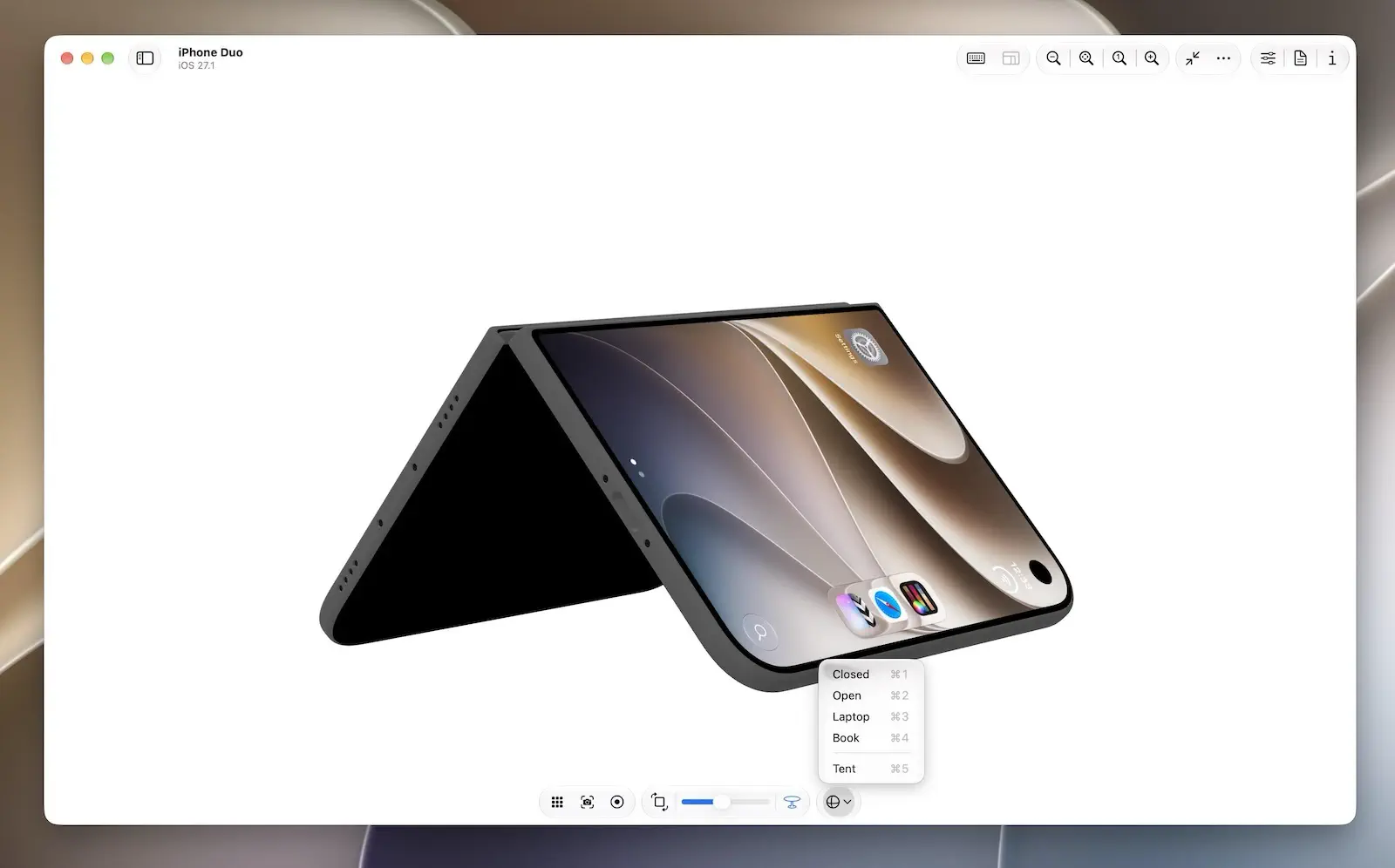
Xcode 27.1 beta, which includes the iPhone Duo simulator, was released on September 18—just five weeks before the device officially goes on sale on October 23. Curiously, Xcode 27.2 beta, which does not include Duo support, had already arrived by then. To prepare for Apple’s newest device, developers actually have to use the lower-numbered version of Xcode. This unusual “two-track beta” situation may stem from Duo having its own OS version and Apple’s need to maintain secrecy before the announcement, but the tradeoff is that developers have been left with a preparation window of only about a month.
In Device Hub, developers can open, close, rotate, and fold the virtual device. But any experienced engineer knows that while a simulator can reproduce geometry and poses, it cannot reproduce affordances or real-world physical interactions.
During this period without feedback from actual hardware, developers can easily drift toward one of two extremes: either feeling lost and becoming reluctant to venture beyond the safest choices, or staring at a virtual window and dreaming up specialized interactions that seem clever on screen but turn out to be awkward and frustrating when the device is actually held in the hand.
With the countdown already underway, a more pragmatic approach is to first draw a reasonable boundary around what “adapting” really means—to distinguish between “good enough” and “actually good.”
Apple has made it clear that existing apps can run on Duo without being rebuilt, but “it runs” obviously does not mean “it has been adapted.” Making sure an app presents itself naturally and reliably on the new device is the baseline for being “good enough” at launch. What an experience that is truly “good” on a foldable device looks like, however, may only begin to reveal itself once the hardware is actually in developers’ hands.
October 23 may not be the end of the Duo adaptation process. It may be the day it truly begins.
Original
ArrangementView: Think Before You Arrange
When I first saw the ArrangementView API, something about it felt vaguely awkward, though I couldn’t quite put my finger on why. It wasn’t until I actually used it in Xcode 27.1 beta that the feeling began to take shape. After reading more of Apple’s materials and putting the API back into the context of the iPhone Duo, I realized that this discomfort came from two places. Part of it was simply that I hadn’t understood where the API was meant to fit; once I did, that part made sense. The other part came from the API itself—and remained even after I understood its design.
To use ArrangementView well, then, it helps to think one step further before reaching for it: What exactly is the relationship between the content? Which decisions can be left to the container, and which trade-offs still belong to the app? Think before you arrange.
Recent Recommendations
What’s new in Swift 6.4’s from Apple’s engineers
Taking the answers Apple engineers gave at the WWDC26 Swift Group Lab as his starting point, Xiangyu cross-checks each one against Evolution proposals, compiler source code, and official documentation. He clarifies which capabilities have actually shipped and which are still in transition, and corrects several version and implementation details from the live answers.
The most thought-provoking topic is “if we could do it over again.” In early Swift Concurrency, nonisolated async functions automatically left the caller’s actor and ran on the global concurrent executor. After years of real-world use, the Swift team now believes it makes more sense for them to stay on the caller’s actor by default. Had they been designing from scratch, that is what they would have shipped from day one. Although this behavior still requires explicit opt-in in Swift 6.4, it clearly shows how Swift Concurrency keeps recalibrating its defaults based on real migration experience.
withTaskCancellationShield: Swift 6.4 new feature
withTaskCancellationShield (SE-0504), introduced in Swift 6.4, lets a block of code run unaffected by its task’s existing cancellation state, which makes it well suited to wrap-up and cleanup logic that must complete. It does not undo the cancellation itself. Instead, code inside the shield (including any child tasks created there) temporarily cannot “see” the cancellation, and once execution leaves the shield, the original cancellation state becomes visible again. Because the API relies on the concurrency runtime that ships with the operating system, it is only available on the 27-series OSes and, unfortunately, cannot be back-deployed.
Omar Elsayed offers a transitional workaround: create an unstructured task and await its value. Cancellation does not automatically propagate to the new task, and awaiting its value ensures the current task waits for the cleanup to finish before moving on, so the result closely approximates the real shield. Omar also stresses that this is only a stopgap. It adds overhead and requires captured values to be Sendable. Once your minimum deployment target allows it, you should switch to the official API.
Running iOS Background Tasks Reliably, Part 2
In Part 1, Irving Popovetsky drew on long-term, on-device observation to develop a set of practices for making BGTaskScheduler more reliable. One problem, however, remained unsolved: when a user goes a long time without opening the app, the execution opportunities granted to background tasks gradually dwindle.
This time, he found a breakthrough in a single remark from WWDC20: the system does not throttle silent pushes based on how often an app is used. So he set up a Cloudflare Worker that writes a WakePing record to the CloudKit public database every hour, then uses a CKQuerySubscription to trigger a silent push that wakes the app. The whole process requires no device token management and touches no user data. After several months in production, syncs still fire almost exactly on the hour, even after three consecutive weeks without opening the app. This certainly doesn’t turn iOS background execution into a true cron, but it is an excellent demonstration of how combining BGTaskScheduler, CloudKit, and background notifications can meaningfully improve the reliability of background work.
Dissecting Xcode 27’s mcpbridge: Apple Skipped swift-sdk and Built Its Own MCP Stack
Although Apple also takes part in maintaining the official Swift MCP SDK, Xcode 27’s own MCP implementation takes a different path entirely. Snow Wu exported and examined the symbol tables of mcpbridge, mcp-server, and related private frameworks, and found that nearly everything, from JSON-RPC and the MCP semantic layer to command-line argument parsing, is built in-house.
This “start from scratch” approach isn’t merely about avoiding third-party dependencies. mcpbridge itself doesn’t even contain any tool definitions. It only handles protocol translation and routing between external agents and Xcode, while the actual tool capabilities remain inside Xcode. Combined with a three-process architecture, XPC communication, and a three-layer permission gate, it becomes clear that Apple isn’t simply embedding an MCP server in Xcode. Rather, it treats MCP as a system architecture problem: how to let untrusted external agents safely connect to a GUI application with complex state.
Apple Watch brings distributed system headaches to your app
When both iPhone and Apple Watch can read and modify the same state, what you’re dealing with is effectively a small distributed system: two independent nodes that may lose contact at any moment, keep modifying data on their own, and reconnect only hours or even days later. Jacob Bartlett revisits Watch Connectivity from this perspective, using the CAP theorem to dissect the trade-offs behind each WCSession API. sendMessage requires the counterpart to be immediately reachable, sacrificing availability during a partition in exchange for real-time, acknowledged interaction. updateApplicationContext and transferUserInfo, by contrast, tolerate temporary inconsistency in favor of availability; the former keeps only the latest state, while the latter delivers every change in order.
This perspective also turns “which Watch Connectivity API should I use?” from a question of interface capabilities into a question of product semantics. Login state, settings sync, recording controls, and other kinds of data have different requirements for consistency and availability, and different features within the same app can perfectly well make different choices.
iPhone Duo & AnyOS 27 Adaptation
- codelaby introduces the Reserved Regions API added in iOS 27.1, and shows how to obtain the crease (division) and camera occlusion regions through
GeometryProxy. For custom layouts that system containers can’t handle automatically, it offers a reliable way to keep important content out of the crease and camera areas. - Antoine van der Lee takes a practical, adaptation-first approach, systematically walking through the new capabilities: the iPhone Duo Simulator, resizable layouts,
ArrangementView, Reserved Regions, hinge state, and the vertical toolbar. The core idea is not to design a separate interface for Duo, but to first make your app genuinely adapt to variable space, then use Duo-specific APIs to enhance special cases. - Ronnie W. discovered that macOS 27 re-decides how SwiftUI toolbar items are grouped: even with
ToolbarSpacer, items you intended to keep separate may still be merged into the same navigation island. The fix is refreshingly direct: when you need precise control over grouping, let AppKit’sNSToolbarItemGrouptake over the macOS toolbar structure. - Anton Gubarenko compiled Apple engineers’ answers to developer questions from two iPhone Duo Group Labs (Part 2), covering a wide range of practical issues including adaptive layout, fold postures, the vertical toolbar, multiple windows, the camera, accessibility, and the Simulator. The advice running through it all is remarkably consistent: treat Duo as an iPhone with more variable space, rely first on system containers and adaptive layout, and only intervene with creases, hinges, and specific postures when truly necessary.
- Sarunw explains how the system decides whether a toolbar item on iPhone Duo goes into the horizontal or vertical toolbar: provide both an icon and a title so the system can choose the presentation based on available space, and only when the default judgment isn’t right should you use
axisBehaviorto explicitly specify.horizontalOnlyor.verticalPreferred.
Tools
PaintKit: A Swift Raster Drawing and Image Processing Engine
Developed by Josh Lin, PaintKit is a standalone Swift raster drawing engine extracted from the ItsPaint project. It covers pixel storage and blending, rasterization, brushes and shapes, selections, undo, text rendering, and image and PDF encoding/decoding. The engine is built on premultiplied-alpha RGBA8 pixels, and every edit returns the region that actually changed, so both screen refreshes and undo records only need to process the pixels that matter. Undo history isn’t simply capped by operation count either; it is managed by actual memory usage through local pixel patches. PaintKit has no dependencies on AppKit, SwiftUI, or third-party libraries, adopts Swift 6 strict concurrency, and most of its functionality can be verified with swift test without launching an app or an Xcode project.
ItsPaint is the complete application and real-world proving ground for PaintKit. It is a lightweight, native macOS drawing and screenshot annotation tool offering 13 tools, including pencil, brush, shapes, text, selection, pixelate, and spotlight. It supports 15 shapes, nine export formats, and PDF annotation, and can remove simple backgrounds without using machine learning models or network services. ItsPaint is also open source and available as a free download on the App Store.
SwiftFairy: A SwiftUI Review Tool That Keeps Agents from Forgetting What They’ve Read
A macOS tool built by Natalia Panferova and Matthaus Woolard that provides Swift and SwiftUI code review for coding agents through a local MCP server.
Rather than writing a large set of rules into a Skill or AGENTS.md and hoping the agent recalls them at the right moment, SwiftFairy hands “finding problems” over to deterministic static analysis. It parses code into a partial graph, matches it against declarative issue patterns, pinpoints findings to specific lines, and then passes the corresponding explanations and fix examples to the agent. Knowledge only enters the context when an issue is actually hit, which both keeps the agent from “forgetting what it read” and reduces token usage.
Much of SwiftFairy’s value also comes from the rules themselves. The knowledge is currently organized into “Scrolls,” with the first batch covering Proper SwiftUI, Performant Swift Charts, and Modern Swift. The content draws on the two authors’ years of books and articles, as well as Natalia’s experience working on Apple’s core SwiftUI team. Compared with having another LLM do the review, SwiftFairy is more like adding a layer of domain-aware, reproducible static review to the agent workflow.