
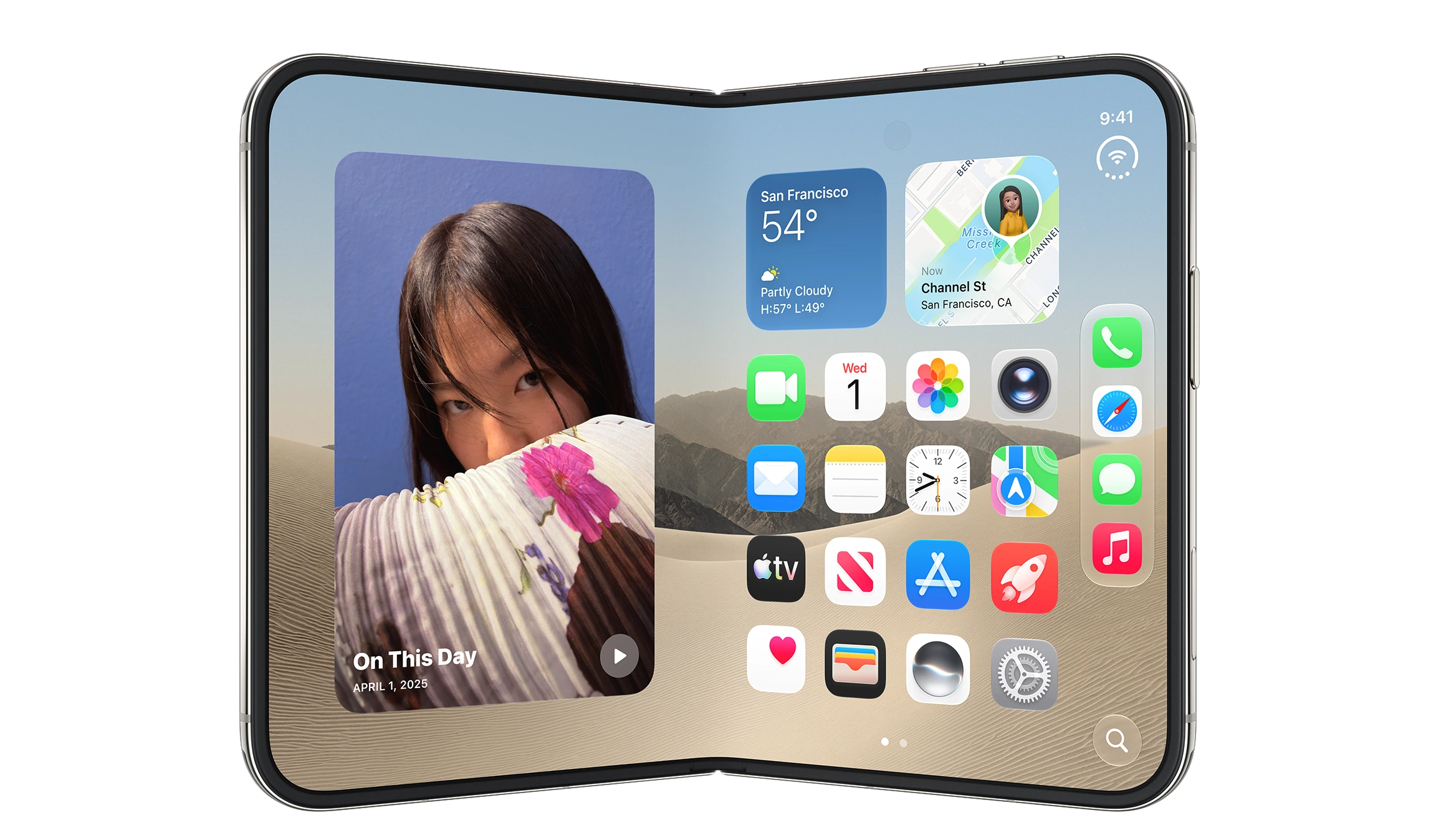
Although some details of the iPhone Duo’s design had already leaked months ago, and Apple is a latecomer to the foldable phone market, its ability to tightly integrate hardware and software—and the interaction changes that integration enables—still managed to surprise quite a few consumers.
Different research firms have offered forecasts for the iPhone Duo’s early sales using different time frames. Counterpoint expects shipments to reach as many as 6 million units by the end of 2026, while IDC estimates that the device could reach around 10 million units in its first 12 months on the market. That would still represent only a small fraction of total iPhone sales. But compared with the hundreds of thousands of Vision Pro units sold over its first two and a half years, it is already a large enough market to support quite a few apps designed specifically for this device. Over the past few days, I’ve already seen plenty of creative ideas on social media built around the Duo’s form factor. If even a few of them turn into breakout hits, they could further drive device sales. More importantly, the Duo has far greater social visibility than Vision Pro. The sense of being “different” that comes from distinctive hardware paired with distinctive apps is exactly what many early adopters of products like this are looking for.
For most developers, however, the adaptation pressure created by the iPhone Duo’s unique form factor is very real. The Duo has both outer and inner displays, while the inner display can be used fully open, partially folded, and in other poses. It is arguably one of the most challenging devices in the iPhone family to design for. Apple does provide a number of APIs specifically for adapting to these configurations, and standard containers already handle different poses reasonably well. But those things mainly solve the UI problem. The real challenge is UX: an API can tell you how much space is available and where the hinge is, but it cannot tell you what users actually want to see when the device is partially folded. Every additional pose means another experience that needs to be designed.
For teams using third-party frameworks such as Flutter and React Native, the problem starts one step earlier: it is not just about how well you can adapt, but whether you can access the necessary information in the first place. Flutter’s MediaQuery.displayFeatures returns an empty list on the Duo regardless of the fold angle, while React Native still provides no official API for accessing fold state. Once the hardware itself becomes part of the interaction model, cross-platform frameworks have to make more tradeoffs between hiding platform differences and exposing platform capabilities. And those tradeoffs are difficult for a framework to absorb on its own—it will always lag behind the platform.
In fact, the trend toward reevaluating cross-platform approaches had already begun before the Duo was announced, driven by several changes happening at the same time. AI coding agents have substantially reduced the cost of native development and maintenance, while changes such as Liquid Glass and Duo continue to raise the value of taking full advantage of platform-specific capabilities. The cost-benefit equation for cross-platform development is being squeezed from both directions. Notion is migrating its Apple-platform UI from a web-based technology stack to SwiftUI. Around the same time, Shopify announced that it was moving its mobile apps from React Native back to Swift and Kotlin. One reason it cited was that advances in coding models are eroding one of the key cost advantages of cross-platform development: avoiding having to “build the same feature twice.” Alongside that transition, Shopify is also handing off its React Native open-source libraries.
For the Apple ecosystem, iPhone Duo is a product that brings genuine change. Over the past few years, most changes to Apple’s platforms have taken place in software and design language. Duo, by contrast, changes the physical form factor developers have to design for. Its significance to the ecosystem may not lie in selling a few million more devices, but in what happens when the device itself once again becomes part of application design: “using the platform’s native frameworks” is starting to shift from a matter of preference to a matter of cost.
Recent Recommendations
Module Tracking in Swift Debug Info
Have you ever hit a breakpoint, typed a seemingly trivial LLDB expression, and then waited… and waited? To evaluate a computed property or call a method, LLDB sometimes has to spin up the Swift compiler and locate and load the relevant modules. In the past, that lookup couldn’t always find the exact module your code was built from, and it might even recompile some dependencies along the way, turning a simple debugging step into a long pause.
Adrian Prantl introduces Module Tracking, a mechanism that began in Swift 6.3 and is further refined in 6.4. The new approach lets debug info tell LLDB precisely: “these are the modules the build actually used, and here is where they live,” cutting out unnecessary searching and recompilation. Swift 6.4 also improves bridging header handling and noticeably slims down debug artifacts — dSYM bundles on Darwin no longer carry binary Swift modules, and binaries built with debug info on Windows and Linux benefit as well.
New Hashable conformances in Swift 6.4
Artem Mirzabekian walks through several standard library types that gain Hashable conformance in Swift 6.4, coming from two proposals: SE-0514 (Dictionary.Keys, CollectionOfOne, EmptyCollection) and SE-0523 (UnownedTaskExecutor). The one closest to everyday development is Dictionary.Keys, which can now go straight into a Set or serve as a dictionary key without first being converted to another type.
The semantics are worth noting: two Dictionary.Keys values are equal as long as they contain the same keys — order participates in neither comparison nor hashing, which is consistent with how a dictionary’s own identity is defined. Dictionary.Values did not receive the same treatment, because values can repeat, and expressing that correctly would require multiset semantics that Swift doesn’t currently have. A small piece of completion work, but one that makes these types sit more naturally in generic and collection contexts.
How to list big models cheaply: Vein vs SwiftData
Two weeks ago, in SwiftData: Optimization Starts with Modeling, I discussed the memory and performance pressure that “fat models” put on SwiftData lists, and tried to reduce how much data a single query actually loads by splitting the model. Mia Köring took the benchmark code from that article and used it to show how Vein, the persistence framework she is building, performs with field-level lazy loading.
Vein declares models much the way SwiftData does, and by default behaves similarly too: properties are eagerly loaded, relationships lazily. The difference is that marking a property with @LazyField defers reading it until it is actually accessed. As a result, in a “title-only list” scenario, Vein reaches good numbers without any model splitting at all.
Sad But True: Localized App Store Screenshots That Verify Themselves
Automation keeps working its way into every stage of app development. But in practice, the hard part often isn’t implementing the automation — it’s getting it to prove that it did the right thing.
While generating localized App Store screenshots automatically, Wesley Matlock discovered that his Spanish screenshots had quietly fallen back to English, while the entire test run still reported success. The cause turned out to be -testLanguage not reliably reaching the app under Xcode 27. Wesley switched to setting the simulator’s language through simctl, and added a check that compares the SHA-256 of the captured screenshots to catch cases where two languages, or two different screens, unexpectedly produce byte-identical images.
Wesley’s screenshot-hashing approach transfers to any pipeline where you hand a request to a black box and then accept whatever comes back at face value.
Transition or ContentTransition
transition and contentTransition have remarkably similar names, but they solve two different problems: the former animates a view being inserted into or removed from the view hierarchy, the latter applies when the view stays put and only the content it displays changes. Stewart Lynch compares them side by side using conditional views, changing numbers, and SF Symbols, and covers common content transitions such as .numericText, .interpolate, and .symbolEffect.
SwiftUI has supported custom
transitionvalues for a long time, but that capability has never extended to higher-level scenarios like sheets or navigation changes. Those situations resemblecontentTransition, and still rely mostly on the handful of transitions the system provides. It would be good to see SwiftUI eventually connect these different levels of the transition concept — or at least give developers more room to customize them.
Abstracting SwiftUI state with scopes
When a SwiftUI view holds several @State properties, we often abstract them into a single @Observable. But what if the view also depends on environment values or other Observable instances? Is there a way to organize state coming from different sources while reducing the view’s coupling to any particular one of them? Mike Apurin proposes thinking in scopes: his library ScopedState gathers multiple state sources behind a unified access boundary, exposing to a view only the state and actions that screen genuinely needs. The view doesn’t need to know where any of it comes from, and swapping the data source in previews and tests becomes much easier. Worth noting: this isn’t an attempt to build yet another state management model along the lines of TCA or MVVM — it’s a way of organizing and abstracting existing state sources at the view layer.
Before the Fold: Adapting for iPhone Duo
The arrival of iPhone Duo has consumers marveling at the new form factor, and developers facing a new set of challenges: how to make use of the extra display space, how to make existing layouts adapt across device configurations, and how to take advantage of new interaction capabilities like the fold and multiple display regions. Over the past week, a number of writers offered their perspectives.
- Apple published six Tech Talks on announcement day: Design for iPhone Duo, Prepare your app, Raise the bar, Strike a pose with adaptive layouts, Leverage multiple displays and scenes, and Build a great camera experience, along with a new Designing for iPhone Duo page in the HIG.
- Florian Schweizer makes the case for not fighting the framework: don’t start by asking whether the device is an iPhone Duo, ask how much space this view has been given. He has also distilled these principles, along with Duo’s new APIs and Apple’s developer material, into a SwiftUI iPhone Duo Skill for coding agents working on existing apps.
- Lee young-jun approaches it from hands-on adaptation work, using
NavigationSplitView,sidebarAdaptable, and Device Hub’s Resizing Mode to inspect and improve how an app behaves across iPhone Duo’s different display configurations ahead of time. - Sagar Unagar draws on Apple’s latest HIG and developer material to summarize the main design principles for iPhone Duo: adaptive layout, system controls, the fold region, and the various display configurations.
- Jordan Morgan rounds up the changes developers should look at first — layout, system bars, safe areas, camera, and multiple display regions.
- Artem Mirzabekian introduces the new
ArrangementView, which lets you describe the relationship between two related pieces of content and leaves it to SwiftUI to pick a suitable layout based on available space and the fold region.
Many of the features covered above exist only in Xcode 27.1, so experiencing them in full will take a little while yet.
Tools
SwiftMusic: Declaring Music in Swift
SwiftMusic, from Norikazu Muramoto, is a declarative music composition framework for Apple platform developers. It borrows SwiftUI’s design sensibility, bringing familiar Swift constructs — Music, Sound, body, result builders, and modifiers — into music creation, so that rhythm, melody, harmony, timbre, effects, and mixing relationships can all be described by composing code.
Drums, bass, and synths, for instance, can be written as Swift code that reads musically:
struct Session: Music {
      var body: some Sound {
          Track("Drums") {
              Sample("kick")
                  .rhythm("x ~ x ~")
          }

          Track("Bass") {
              Synthesizer(.saw)
                  .notes("C2 ~ Eb2 G2")
                  .gain(0.3)
          }
      }
  }
SwiftMusic makes no sound on its own: it only compiles your declarations into beat-domain events and an ordered render plan. It neither opens an audio device nor draws an editor — actual audio rendering is the host’s responsibility. The author provides MusicPlaygournd, a live editor for macOS, to fill that role.
Homebrew 7: The Release That Says Goodbye to Intel
Homebrew 7.0.0 is out. Alongside a range of features and internal changes, this major release brings compatibility changes worth paying attention to. On Apple Silicon Macs, macOS 15–27 currently falls within the fully supported range, while Intel Macs have all been moved down to Tier 3 — no full CI support, no new bottles, and a plan to end support entirely in or after September 2027. If you are still running Homebrew on an Intel Mac or an older version of macOS, this one deserves a closer look.