macOS for the Masses, or macOS for Developers?
Contents
- Recent Recommendations
- Raycast has solved keyboard dictation without main app round-trip
- How an Animation Gets to the Screen
- Syncnext: Real-Time Video Frame Interpolation on Apple TV
- SwiftUI ArrangementView for iPhone Duo Layouts
- SwiftUI Liquid Glass: glassEffect, containers and morphing
- I gave Claude a Mac mini…
- I used AI agent skills to make five iOS screenshot sets
- Tools
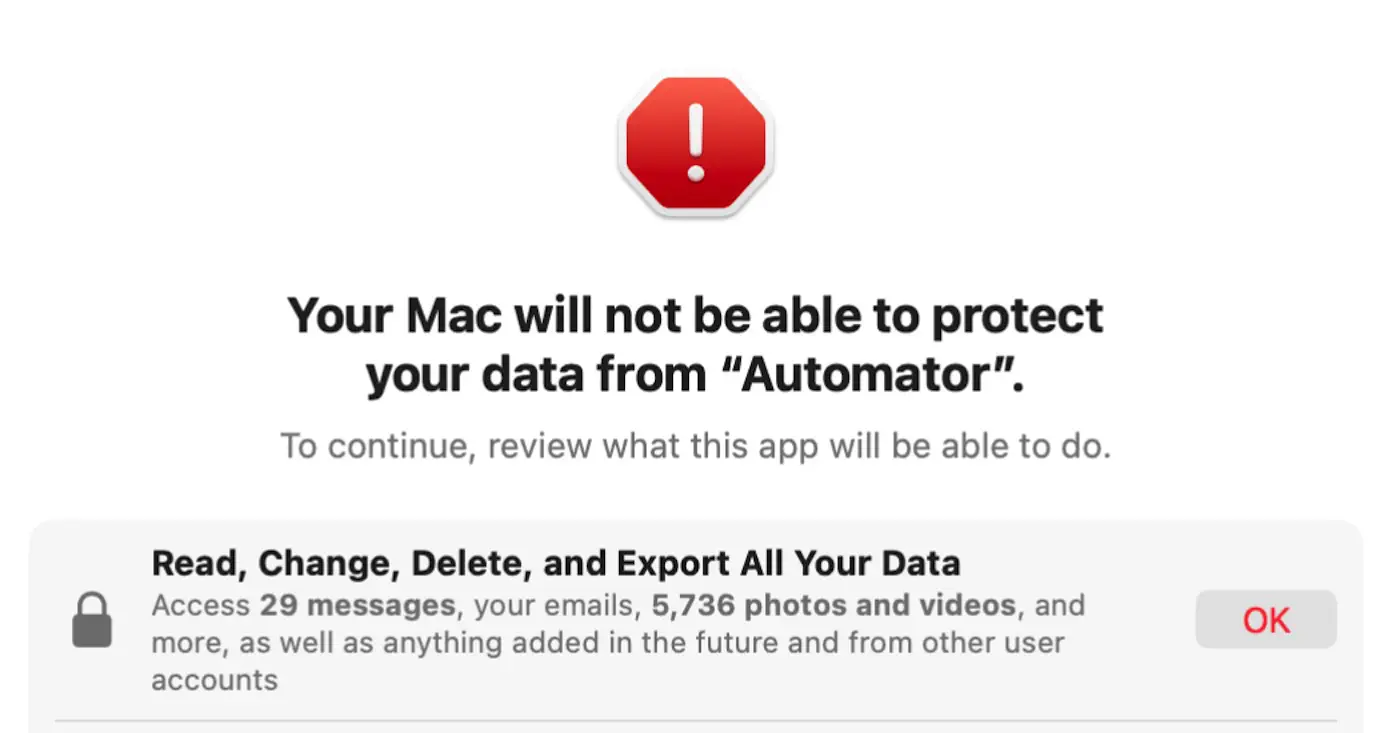
In macOS 27.3 beta 2, when users grant an app Full Disk Access, they are greeted with a dialog carrying a far stronger warning than in any previous version, while the system further steers users toward fine-grained, per-folder or per-app permissions.
This change quickly sparked considerable discussion. Some find Apple’s approach understandable given how sensitive this permission is, while many developers are disappointed. In the era of agents, this design philosophy faces a clear paradox: in traditional human-driven workflows, fine-grained permissions effectively reduce security risks; yet in agent workflows that require autonomous collaboration across tools and directories, demanding real-time user confirmation every time a permission boundary is crossed can turn a mechanism meant to protect users into a frequent point of interruption. Compared with agent-friendly systems like Omarchy, this friction on macOS is becoming increasingly noticeable.
As a developer, I feel this frustration firsthand. For example, even after granting full permissions to Xcode headless MCP, simply opening Xcode still triggers a permission prompt when capturing Preview screenshots. On the other hand, I completely understand Apple’s reasoning behind these strict permission controls. A major reason I chose Macs for my family was the tighter security protection macOS offers everyday consumers. Over the years, their Macs have genuinely benefited from this strict oversight, remaining largely free of security issues.
In the recent Apple Creator Studio update, Apple not only added MCP support to several apps, but also open-sourced a companion library for reading and writing documents along with an official Skill, making it easy for agents to call them directly. This shows that Apple is still actively responding to the demands of the AI era. Still, there is clearly a long way to go in accommodating the vastly different ways everyday consumers and developers use agents.
macOS is not only a go-to platform for developers, but also the daily operating system for hundreds of millions of everyday users. I don’t think it is realistic to expect Apple to loosen its strict permission controls in the mainstream release. However, introducing a permission model better suited for developers and agents inside macOS virtual machines—using the VM’s isolation boundary to convert certain high-frequency authorizations into a one-time grant for the entire development environment—may be a path worth exploring. Virtualization isn’t just useful for local development; it is also a key foundation for future cloud-based builds, testing, and automated workflows. It can offer developers a freer execution environment while keeping a healthy separation from everyday consumer use, without weakening the host machine’s security defenses.
I hope to see that day arrive soon.
Recent Recommendations
Raycast has solved keyboard dictation without main app round-trip
Ever since Apple introduced third-party keyboard extensions in iOS 8, it has prohibited Keyboard Extensions from directly accessing the microphone. To implement voice dictation, developers have typically had to jump to the main app to start recording and then switch back to the keyboard, or maintain a recording session using background audio mode. Recently, Johan Thorell from Raycast shared a new approach: taking advantage of the difference between WebKit’s media capture mechanism and the process restrictions of native keyboard extensions, he embedded a WKWebView inside a keyboard extension, captured audio via JavaScript’s getUserMedia(), and passed the data to Swift for speech recognition. The discovery quickly drew widespread attention in the community, and Stephan Cilliers soon followed up with a complete open-source implementation.
As this workaround rapidly gained traction, KeyboardKit voiced clear concerns in its post: Apple could disable this behavior in a system update at any time, or reject apps using this technique during App Review. As voice input becomes increasingly widespread, the question may no longer be whether developers can find ways around the restriction, but whether Apple should provide an official, controlled voice input API for third-party keyboards.
How an Animation Gets to the Screen
Moving a view from one side of the screen to the other may rely on completely different underlying mechanisms across UIKit, AppKit, and SwiftUI. In this article, Mihaela Mihaljević Jakić conducts extensive comparative testing across five animation properties and four animation types on Mac, iPhone, iPad, and simulators. Combining call stacks, disassembly, shared memory, and Mach Message analysis, she traces an animation’s full journey from code to screen. Her findings show that in the tested macOS environment, SwiftUI animations rely on the main thread to update layers frame by frame; on iOS and iPadOS, however, SwiftUI computes animation values on a dedicated AsyncRenderer thread and passes them to the Render Server through Core Animation’s private Presentation Modifier mechanism.
For a long time, many developers have viewed SwiftUI as an abstraction layer sitting on top of UIKit and AppKit. Yet growing evidence suggests that SwiftUI is forming a much more independent implementation across layout, computation, and rendering. At WWDC 2026, Apple also stated explicitly that the three UI frameworks are gradually converging on a unified underlying architecture, with parts of SwiftUI even becoming the foundation that UIKit and AppKit now rely on. This means developers can no longer depend solely on past experience when building, debugging, or optimizing performance. We have to face a clear reality: SwiftUI is no longer just a new option within Apple’s UI stack—it is becoming a core cornerstone of the entire ecosystem.
Syncnext: Real-Time Video Frame Interpolation on Apple TV
How do you boost 25 fps video to 50 fps in real time on Apple TV while balancing image quality, motion continuity, and hardware performance? In this post, Ronnie Wong documents the full journey of building real-time frame interpolation for her tvOS media player, Syncnext. After experimenting with VideoToolbox, Metal motion compensation, OBS Optical Flow, and RIFE, Ronnie ultimately built on top of VideoToolbox and developed custom local phase reconstruction and region-selection algorithms to eliminate detail flickering in densely textured areas on interpolated frames.
The article’s value lies not just in the algorithms themselves, but in how the author built a repeatable verification pipeline: starting from visually spotting artifacts, moving to quantifying issues through motion trajectories, luminance variations, and detail preservation metrics, and discovering that optimizing a single metric in isolation can actually degrade motion quality. On real Apple TV hardware, she repeatedly tested and tuned GPU workloads alongside algorithmic strategies—because hitting 50 fps in a short run does not guarantee the device can sustain the same performance after prolonged runtime and elevated temperatures.
Compared to iOS and macOS, tvOS has far fewer developers, and those who consistently share hands-on experience are rarer still. Ronnie Wong’s blog chronicles the real-world challenges she has encountered while building tvOS apps—from SwiftUI focus management, system permissions, and App Store review to player architecture and performance optimization. Compared with typical API tutorials, these battle-tested lessons and engineering trade-offs from a shipping product can do far more to help fellow developers avoid common pitfalls.
SwiftUI ArrangementView for iPhone Duo Layouts
Introduced in iOS 27.1, ArrangementView brings a new adaptive layout approach for foldable devices such as iPhone Duo. Using a recipe app as an example, Sean Allen walks through how to use ArrangementView. Beyond the API specifics, the most valuable part of the post is Sean’s explanation of the design philosophy behind ArrangementView: developers describe the relationships and priorities between pieces of content, and SwiftUI decides how to arrange them based on the actual layout environment. Moreover, ArrangementView is not built exclusively for foldables—it works across other Apple devices that support the API as well. iPhone Duo simply makes this ability to dynamically organize content around the layout environment much more intuitive.
When I first encountered
ArrangementView, I felt uneasy about its design philosophy and API. Through recent hands-on work, however, I have gradually come to appreciate the idea it advocates: letting layouts adapt to changing environments by describing relationships between content. Even though I did not end up using the official API directly—moving from a customArrangementHViewto an implementation built on system split views—that experience convinced me further that in many scenarios, expressing content relationships and priorities is a better fit than prescribing exact arrangements. Still, declaring content relationships is only the starting point; developers must also account for device form-factor transitions, system container behavior, and content state and lifecycle across layout changes.
SwiftUI Liquid Glass: glassEffect, containers and morphing
Centered around APIs such as glassEffect, GlassEffectContainer, glassEffectID, and glassEffectUnion, this article uses code examples to cover the fundamentals of Liquid Glass in SwiftUI, morphing animations, and compatibility handling.
More than the tutorial itself, what I really want to recommend is the website behind it: Liquid Glass Design. It curates a rich collection of Liquid Glass and Glassmorphism designs spanning app interfaces, controls, icons, and motion effects, complete with style prompts ready for AI image generation. The site also compiles Apple’s official design guidelines, Figma components, third-party implementations, and cross-platform tutorials.
As AI coding becomes widespread, implementing an interface is getting easier than ever—but coming up with a strong design direction is not. Liquid Glass Design’s Gallery and Prompt Library neatly serve both stages: first exploring visual directions through curated examples, then rapidly generating concepts with AI. It offers more than technical knowledge about Liquid Glass; it provides design inspiration and a starting point for visual exploration.
I gave Claude a Mac mini…
As coding agents continue to improve, code generation speed is no longer the primary bottleneck in development—building, simulators, and test verification are increasingly taking its place. In this post, NatashaTheRobot shares how she rented a Mac mini to build a shared build-and-test environment for multiple parallel coding agents, coordinating simulator usage through a resource queue.
Natasha put together a tiered verification pipeline: if a change can be checked with Swift Package tests, don’t boot a simulator; if it can be verified with SwiftUI Previews, don’t run UI tests; only claim a simulator when a full runtime environment is genuinely needed. This highlights an important insight: the efficiency of parallel agent development does not depend solely on how many agents you run at once, but on whether your development system can deliver timely, reliable verification feedback to all of them.
I used AI agent skills to make five iOS screenshot sets
Creating App Store promotional screenshots has always been a time-consuming task for indie developers—especially when apps must support multiple device sizes, languages, or a whole portfolio of products. In this post, Stalin Kay shares how he used two Agent Skills, StoreShot and App Store Screenshots, to produce iPhone and iPad screenshot sets for five iOS apps.
In his workflow, Stalin captures raw app screens with Fastlane Snapshot and personally decides the screen order, copy, device frames, and color palettes, while the agent sets up an editable layout project to handle arrangement, previews, and exports. StoreShot focuses more on fine-grained control over individual screenshots, whereas App Store Screenshots provides a gallery-style preview for planning an entire set cohesively. Rather than generating one-off marketing images, the real value of this workflow lies in preserving screenshots, copy, and layouts as editable, reproducible engineering assets—making future app updates and localization far easier.
Tools
App Store Compliance Playbook: A Pre-Submission Checklist for App Review
Developed by Mirza Iqbal, App Store Compliance Playbook is a pre-submission self-check toolkit and review-guideline reference for both the App Store and Google Play. The project documents over a hundred common rejection reasons alongside remediation advice, provides scripts to catch common issues in permission usage descriptions, privacy manifests, and store metadata, and includes manual checklists reminding developers to verify items that cannot be checked automatically—such as demo accounts, screenshots, and privacy disclosures.
Using it is straightforward: run a scan in your project directory to surface potential review risks, and once your store metadata is ready, validate copy lengths, privacy policy links, and subscription terms. Teams that ship frequently can also plug it into CI, or integrate it into coding agent workflows like Codex and Claude Code via Skills and Hooks to run checks automatically before submission.
SiliconForest: Running Open-Source Darwin on Apple Silicon
Created by Chris Kearney, SiliconForest is an open-source operating system project built on Darwin/XNU. Starting from PureDarwin, it ports select Apple Silicon drivers from Asahi Linux and achieves GPU acceleration through Mesa, enabling a Darwin system independent of macOS to boot natively on an M1 MacBook Pro without a virtual machine.
Today, SiliconForest can run the Wayland-based Chonkstep desktop environment with support for Wi-Fi, the trackpad, Touch Bar, and hardware video decoding—and can even launch unmodified macOS versions of Firefox as well as Apple’s Terminal and Activity Monitor. These apps run on ported or reimplemented system frameworks rather than macOS itself. That said, the project is still in an early experimental stage: it has only been verified on a single M1 MacBook Pro and does not yet offer an installer or a complete end-to-end build for other developers.
SiliconForest also faces an unresolved licensing and distribution issue. While the project’s original code is licensed under MIT, its ported drivers and system components span licenses such as GPL and APSL. In particular, whether GPL-2.0 drivers prelinked with APSL-2.0 XNU into a single kernel collection can be legally distributed remains to be seen.
GlassIntroKit: Building App Onboarding Animations with Liquid Glass and Metal
Developed by Jiaxu Li, GlassIntroKit is a SwiftUI welcome and onboarding component suite for iOS and macOS. Combining Liquid Glass with Metal, it offers eight composable onboarding pages—including animated handwriting, symbol transitions, 3D scenes, node graphs, physics animations, and app icons. Rather than switching abruptly between screens, pages flow seamlessly into one another through continuous glass morphing, creating a cohesive visual experience. Compared to typical onboarding libraries, GlassIntroKit focuses on brand storytelling and visual presentation rather than functional steps like permission requests or user data collection.
Twoyi: Running Android on iPhone and iPad
Developed by weishu, Twoyi started out as a lightweight, free system container on Android and has now expanded its target to iOS and iPadOS. It can run Android 13 on iPhone and iPad without jailbreaking or JIT, supports installing APKs, and leverages the device GPU for graphics acceleration. To keep overhead low, the project uses AOT code translation and a Linux kernel interface compatibility layer rather than traditional full hardware emulation. It supports iOS and iPadOS 15 and later.
Twoyi’s earlier open-source repository was archived in 2023 under the MPL-2.0 license. However, no complete public source code corresponding to the new iOS implementation has been found so far, so it should not be regarded as a fully open-source Android runtime environment.