
The Foundation framework provides Swift developers with a declarative, modern Formatter API (often referred to as FormatStyle). Compared to the traditional NSFormatter subclasses, this protocol-based API is more aligned with Swift’s language features. This article will explore its design mechanism in depth and demonstrate how to create a custom Formatter through practical examples.
The demo code for this article is available for download on GitHub.
Evolution and Style Transition
What can the Modern Formatter API do?
The modern Formatter provides a convenient interface that allows Swift programmers to present localized formatted strings in an application in a more familiar, “Swifty” way.
Advantages and Limitations of the Native Swift API
Pros and cons are relative. For developers primarily focused on Swift (like myself), the modern Formatter is not only easier to learn and use but also better suited for the increasingly popular declarative programming style. However, in terms of overall functionality and efficiency, the modern Formatter does not always have an absolute advantage.
Comparison: Modern API vs. Traditional NSFormatter
Ease of Use
The most significant advantage of the modern Formatter API compared to the traditional NSFormatter is that it is more intuitive and convenient to call.
Traditional NSFormatter:
let number = 3.147
let numberFormat = NumberFormatter()
numberFormat.numberStyle = .decimal
numberFormat.maximumFractionDigits = 2
numberFormat.roundingMode = .halfUp
let numString = numberFormat.string(from: NSNumber(value: 3.147))!
// 3.15
Modern Formatter API:
let number = 3.147
let numString = number.formatted(.number.precision(.fractionLength(2)).rounded(rule: .up))
// 3.15
Traditional NSFormatter (List):
let numberlist = [3.345, 534.3412, 4546.4254]
let numberFormat = NumberFormatter()
numberFormat.numberStyle = .decimal
numberFormat.maximumFractionDigits = 2
numberFormat.roundingMode = .halfUp
let listFormat = ListFormatter()
let listString = listFormat
            .string(from:
                        numberlist
                        .compactMap { numberFormat.string(from: NSNumber(value: $0)) }
            ) ?? ""
// 3.35, 534.35, and 4,546.43
Modern Formatter API (List):
let numString1 = numberlist.formatted(
    .list(
        memberStyle: .number.precision(.fractionLength(2)).rounded(rule: .up),
        type: .and
    )
)
// 3.35, 534.35, and 4,546.43
Even if you aren’t deeply familiar with the modern API, you can quickly compose the desired formatting result using code completion.
Execution Efficiency
While Apple has emphasized performance improvements, they haven’t told the whole story.
Based on my testing data, the modern API is significantly more efficient (30% – 300% improvement) compared to creating an NSFormatter instance for a single use. However, compared to a reusable Formatter instance, there is still an order-of-magnitude difference.
Traditional NSFormatter (Creating instance every time):
func testDateFormatterLong() throws {
    measure {
        for _ in 0..<count {
            let date = Date()
            let formatter = DateFormatter()
            formatter.dateStyle = .full
            formatter.timeStyle = .full
            _ = formatter.string(from: date)
        }
    }
}
// 0.121s
Traditional NSFormatter (Creating instance once):
func testDateFormatterLongCreateOnce() throws {
    let formatter = DateFormatter()
    measure {
        for _ in 0..<count {
            let date = Date()
            formatter.dateStyle = .full
            formatter.timeStyle = .full
            _ = formatter.string(from: date)
        }
    }
}
// 0.005s
Modern Formatter API:
func testDateFormatStyleLong() throws {
    measure {
        for _ in 0..<count {
            _ = Date().formatted(.dateTime.year().month(.wide).day().weekday(.wide).hour(.conversationalTwoDigits(amPM: .wide)).minute(.defaultDigits).second(.twoDigits).timeZone(.genericName(.long)))
        }
    }
}
// 0.085s
With the modern API, the more you configure, the longer the execution time. However, unless you are in a high-performance scenario, the efficiency of the modern Formatter API is generally satisfactory.
Consistency
In the traditional API, we need to create different Formatter instances for different types (e.g., NumberFormatter for numbers, DateFormatter for dates).
The modern Formatter API provides a unified calling interface for every supported type, reducing code complexity.
Date.now.formatted()
// 9/30/2021, 2:12 PM
345.formatted(.number.precision(.integerLength(5)))
// 00,345
Date.now.addingTimeInterval(100000).formatted(.relative(presentation: .named))
// tomorrow
Customization Difficulty
The convenience of the modern API is built upon significant underlying work. Unlike the traditional API where properties are set directly, the modern API uses a functional approach, requiring separate setter methods for each property. While not complex, the workload for the developer creating the formatter is noticeably higher.
AttributedString Support
The modern API provides AttributedString support for every convertible type. Using Fields within AttributedString, you can easily generate specific display styles.
var dateString: AttributedString {
    var attributedString = Date.now.formatted(.dateTime
        .hour()
        .minute()
        .weekday()
        .attributed
    )
    let weekContainer = AttributeContainer()
        .dateField(.weekday)
    let colorContainer = AttributeContainer()
        .foregroundColor(.red)
    attributedString.replaceAttributes(weekContainer, with: colorContainer)
    return attributedString
}

Text(dateString)
Type Safety
In the modern Formatter API, everything is type-safe. Developers don’t need to constantly refer to documentation; your code benefits from compile-time checks.
Traditional NSFormatter:
let dateFormatter: DateFormatter = {
    let formatter = DateFormatter()
    formatter.dateFormat = "yyyy-MM-dd HH:mm:ss"
    return formatter
}()

let dateString = dateFormatter.string(from: Date.now)
Modern Formatter API:
let dateString = Date.now.formatted(.iso8601.year().month().day().dateSeparator(.dash).dateTimeSeparator(.space).time(includingFractionalSeconds: false).timeSeparator(.colon))In terms of code volume, the modern API might not look better here. However, you no longer have to worry about yyyy vs YYYY or MM vs mm, nor do you need to check headache-inducing documentation, reducing the likelihood of bugs. This type-safe configuration is a best practice in modern Swift development.
Declarative Style and Protocol-Oriented Approach
The traditional NSFormatter is a product of Objective-C. It is efficient and powerful, but it often feels un-Swifty.
The modern Formatter API is built entirely for Swift, adopting the current trend of declarative style. Developers simply declare what fields need to be displayed, and the system handles the presentation.
Both styles will coexist in the Apple ecosystem for a long time. Developers can choose the approach that best suits their needs. This isn’t just a style shift; it’s a significant step for the Foundation framework toward Swift modernization, making it the preferred choice for frameworks like SwiftUI.
Conclusion
The modern Formatter API is not a direct replacement for the legacy NSFormatter API; rather, it is a Swift-native implementation of it. It covers most functions of the old API while focusing on improving the developer experience.
We will likely see more core frameworks receive Swift-native versions in the future. the introduction of AttributedString alongside these formatters further proves this direction.
How to Customize the Modern Formatter API
Differences in Customization
The legacy API is class-based. To create a custom formatter, you inherit from Formatter and implement at least two methods:
class MyFormatter: Formatter {
    // Convert object to string
    override func string(for obj: Any?) -> String? {
        guard let value = obj as? Double else { return nil }
        return String(value)
    }

    // Convert string back to object
    override func getObjectValue(_ obj: AutoreleasingUnsafeMutablePointer<AnyObject?>?, for string: String, errorDescription error: AutoreleasingUnsafeMutablePointer<NSString?>?) -> Bool {
        guard let value = Double(string) else { return false }
        obj?.pointee = value as AnyObject
        return true
    }
}
The data conversion is completed within a single class.
The modern API reflects Swift’s protocol-oriented nature, using two protocols (FormatStyle and ParseStrategy) to define the formatting and parsing directions separately.
The Protocols
FormatStyle
Converts a value into a formatted representation.
public protocol FormatStyle : Decodable, Encodable, Hashable {
    associatedtype FormatInput
    associatedtype FormatOutput

    func format(_ value: Self.FormatInput) -> Self.FormatOutput
    func locale(_ locale: Locale) -> Self
}
Usually, FormatOutput is either String or AttributedString. The locale method is used to set regional information.
ParseStrategy
Converts formatted data back into the original type.
public protocol ParseStrategy : Decodable, Encodable, Hashable {
    associatedtype ParseInput
    associatedtype ParseOutput

    func parse(_ value: Self.ParseInput) throws -> Self.ParseOutput
}
The parse definition is much easier to understand than the legacy getObjectValue.
ParseableFormatStyle
Since FormatStyle and ParseStrategy are independent, Apple provided the ParseableFormatStyle protocol to implement both in a single structure.
public protocol ParseableFormatStyle : FormatStyle {
    associatedtype Strategy : ParseStrategy where Self.FormatInput == Self.Strategy.ParseOutput, Self.FormatOutput == Self.Strategy.ParseInput

    var parseStrategy: Self.Strategy { get }
}
Other Details
While ParseableFormatStyle doesn’t strictly require AttributedString output, official formatters usually provide it. To make them easier to call, official formatters utilize Swift’s Static Member Lookup feature.
extension FormatStyle where Self == IntegerFormatStyle<Int> {
    public static var number: IntegerFormatStyle<Int> { get }
}
Practical Example: UIColor Formatter
Targets
We will implement a Formatter for UIColor with the following features:
- Convert to
String(e.g.,#FFFFFF) - Convert to
AttributedString - Parse from
StringtoUIColor - Support chainable configuration (Prefix, Markers, Alpha visibility)
- Support Localization
Implementing ParseStrategy
Converting a string to a UIColor:
struct UIColorParseStrategy: ParseStrategy {
    func parse(_ value: String) throws -> UIColor {
        var hexColor = value
        if value.hasPrefix("#") {
            let start = value.index(value.startIndex, offsetBy: 1)
            hexColor = String(value[start...])
        }

        if hexColor.count == 6 {
            hexColor += "FF"
        }

        if hexColor.count == 8 {
            let scanner = Scanner(string: hexColor)
            var hexNumber: UInt64 = 0

            if scanner.scanHexInt64(&hexNumber) {
                return UIColor(red: CGFloat((hexNumber & 0xff000000) >> 24) / 255,
                               green: CGFloat((hexNumber & 0x00ff0000) >> 16) / 255,
                               blue: CGFloat((hexNumber & 0x0000ff00) >> 8) / 255,
                               alpha: CGFloat(hexNumber & 0x000000ff) / 255)
            }
        }

        throw Err.wrongColor
    }

    enum Err: Error {
        case wrongColor
    }
}
Implementing ParseableFormatStyle
struct UIColorFormatStyle: ParseableFormatStyle {
    var parseStrategy: UIColorParseStrategy {
        UIColorParseStrategy()
    }

    private var alpha: Alpha = .none
    private var prefix: Prefix = .hashtag
    private var mark: Mark = .none
    private var locale: Locale = .current

    enum Prefix: Codable { case hashtag, none }
    enum Alpha: Codable { case show, none }
    enum Mark: Codable { case show, none }

    init(prefix: Prefix = .hashtag, alpha: Alpha = .none, mark: Mark = .none, locale: Locale = .current) {
        self.prefix = prefix
        self.alpha = alpha
        self.mark = mark
        self.locale = locale
    }

    func format(_ value: UIColor) -> String {
        let (prefix, red, green, blue, alpha, redMark, greenMark, blueMark, alphaMark) = Self.getField(value, prefix: prefix, alpha: alpha, mark: mark, locale: locale)
        return prefix + redMark + red + greenMark + green + blueMark + blue + alphaMark + alpha
    }
}

extension UIColorFormatStyle {
    static func getField(_ color: UIColor, prefix: Prefix, alpha: Alpha, mark: Mark, locale: Locale) -> (prefix: String, red: String, green: String, blue: String, alpha: String, redMask: String, greenMark: String, blueMark: String, alphaMark: String) {
        var r, g, b, a: CGFloat
        (r, g, b, a) = (0, 0, 0, 0)
        color.getRed(&r, green: &g, blue: &b, alpha: &a)

        let formatString = "%02X"
        let prefixStr = prefix == .hashtag ? "#" : ""
        let red = String(format: formatString, Int(r * 0xff))
        let green = String(format: formatString, Int(g * 0xff))
        let blue = String(format: formatString, Int(b * 0xff))
        let alphaStr = alpha == .show ? String(format: formatString, Int(a * 0xff)) : ""

        var (redMark, greenMark, blueMark, alphaMark) = ("", "", "", "")
        if mark == .show {
            redMark = "Red: "
            greenMark = "Green: "
            blueMark = "Blue: "
            alphaMark = alpha == .show ? "Alpha: " : ""
        }

        return (prefixStr, red, green, blue, alphaStr, redMark, greenMark, blueMark, alphaMark)
    }
}
Chainable Configuration
extension UIColorFormatStyle {
    func prefix(_ value: Prefix = .hashtag) -> Self {
        var result = self
        result.prefix = value
        return result
    }

    func alpha(_ value: Alpha = .show) -> Self {
        var result = self
        result.alpha = value
        return result
    }

    func mark(_ value: Mark = .show) -> Self {
        var result = self
        result.mark = value
        return result
    }

    func locale(_ locale: Locale) -> UIColorFormatStyle {
        var result = self
        result.locale = locale
        return result
    }
}
Localization Support
Since the output of format is a String, we need to convert the Mark into localized text within getField.
Note: It is important to realize that the
localeparameter inString(localized: locale:)primarily affects how formatters inside string interpolations behave. Therefore, when creating a custom Formatter, we must explicitly handle the passing of locale information.
let colorString = UIColorFormatStyle().mark().locale(Locale(identifier: "zh-cn")).format(UIColor.blue)
// Output: # 红:00 绿:00 蓝:FF
AttributedString Support
Define custom Fields to allow users to style different parts of the AttributedString.
enum UIColorAttribute: CodableAttributedStringKey, MarkdownDecodableAttributedStringKey {
    enum Value: String, Codable {
        case red, green, blue, alpha, prefix, mark
    }
    static var name: String = "colorPart"
}

// ... Scope and Lookup extensions ...
For more details on
AttributedString, refer to my article: Explaining AttributedString in Depth.
Unification
Add extensions to FormatStyle and UIColor to match the official API experience:
extension FormatStyle where Self == UIColorFormatStyle {
    static var uiColor: UIColorFormatStyle { UIColorFormatStyle() }
}

extension UIColor {
    func formatted<F>(_ format: F) -> F.FormatOutput where F: FormatStyle, F.FormatInput == UIColor {
        format.format(self)
    }
}
Final Result
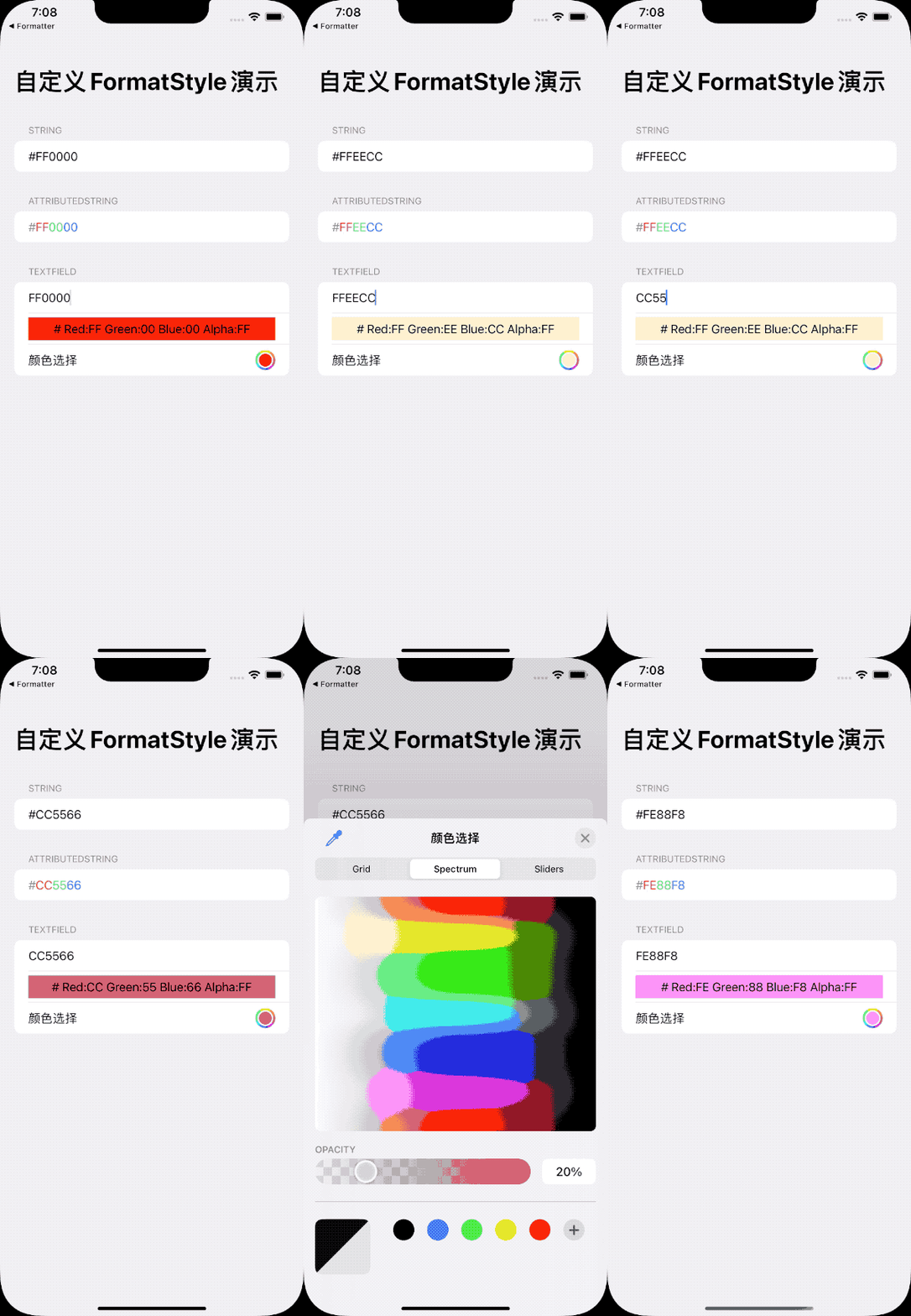
Full code is available on GitHub.
Summary
While Apple provides a wide range of built-in formatters, understanding the modern FormatStyle protocols allows us to grasp the design logic of the framework and better leverage these tools in our code.