
TL;DR: When handling entity inheritance, Core Data and SwiftData utilize a Single Table Inheritance strategy by default. This means the parent entity and all its subclasses are stored in the same SQLite table. While this design simplifies query logic, it can lead to storage inefficiencies and performance degradation due to sparse columns when dealing with highly heterogeneous child entities.
Context
Unlike many relational database ORM solutions, Core Data and SwiftData—as object graph management frameworks—treat “Entity Inheritance” as a first-class citizen. This allows developers to build data models with inheritance relationships just as they would with native Swift classes.
However, many developers are unaware of the physical storage mechanism at the SQLite level. Using inheritance in inappropriate scenarios (such as with vastly different subclasses or massive data volumes) is often a “silent killer” that leads to slow app launches and sluggish queries.
The Underlying Mechanism: Single Table Inheritance
In the SQLite file generated by Core Data or SwiftData, the general rule is “One Entity equals One Table.” However, once inheritance is introduced, this rule changes.
Core Mechanism: Core Data/SwiftData does not create separate tables for each subclass. Instead, it merges data from the parent entity and all its child entities into a single table (usually named after the parent entity).
For example, suppose you have a Publication parent entity, along with two child entities: Book and AcademicPaper.
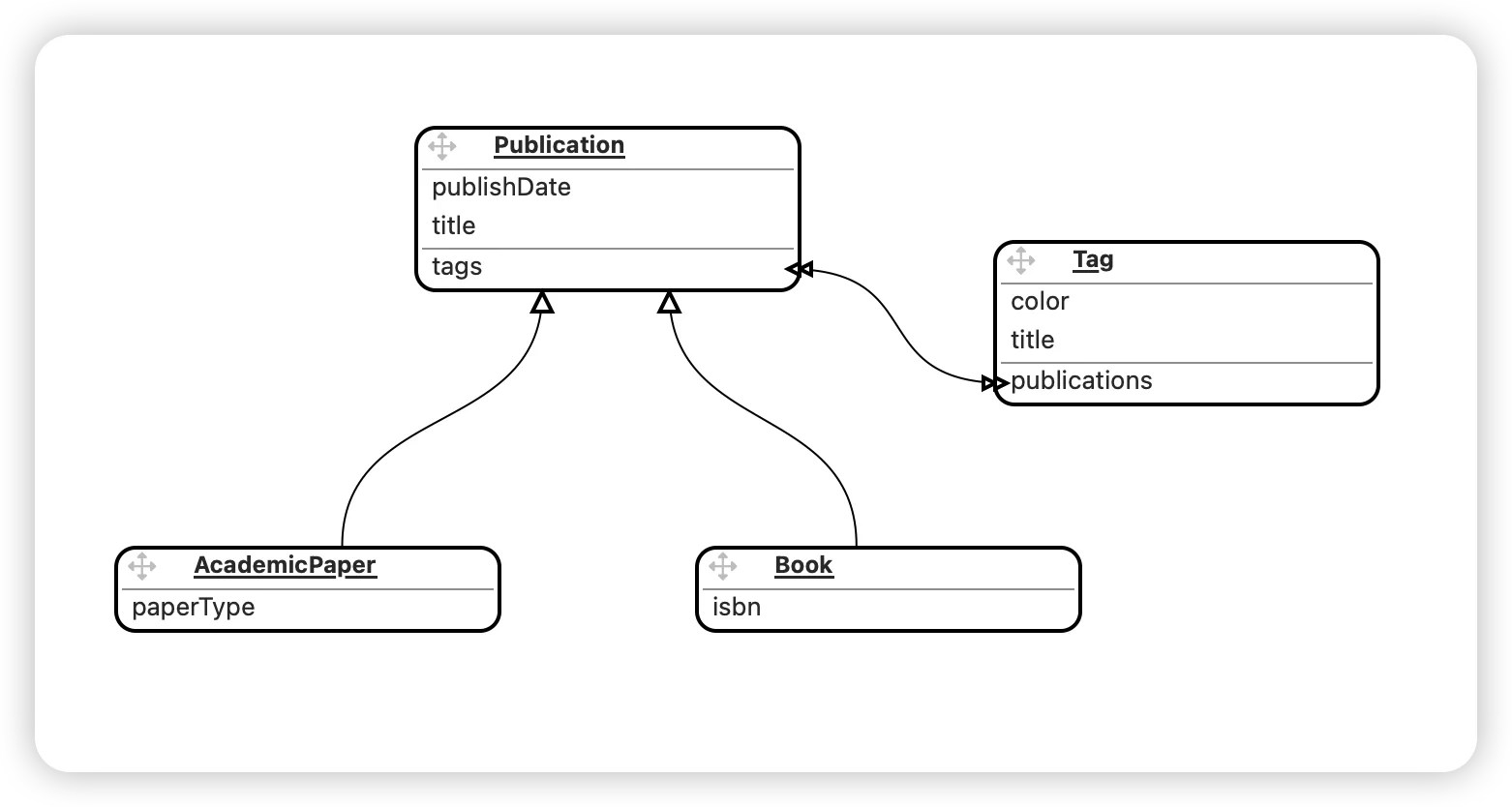
At the SQLite level, the system creates a “Super Table” containing all possible fields. To accommodate the unique attributes of each subclass, this table operates in a redundant mode:
- It contains all common fields from the parent
Publication. - It contains fields specific to
Book(e.g.,isbn). - It contains fields specific to
AcademicPaper(e.g.,journal).
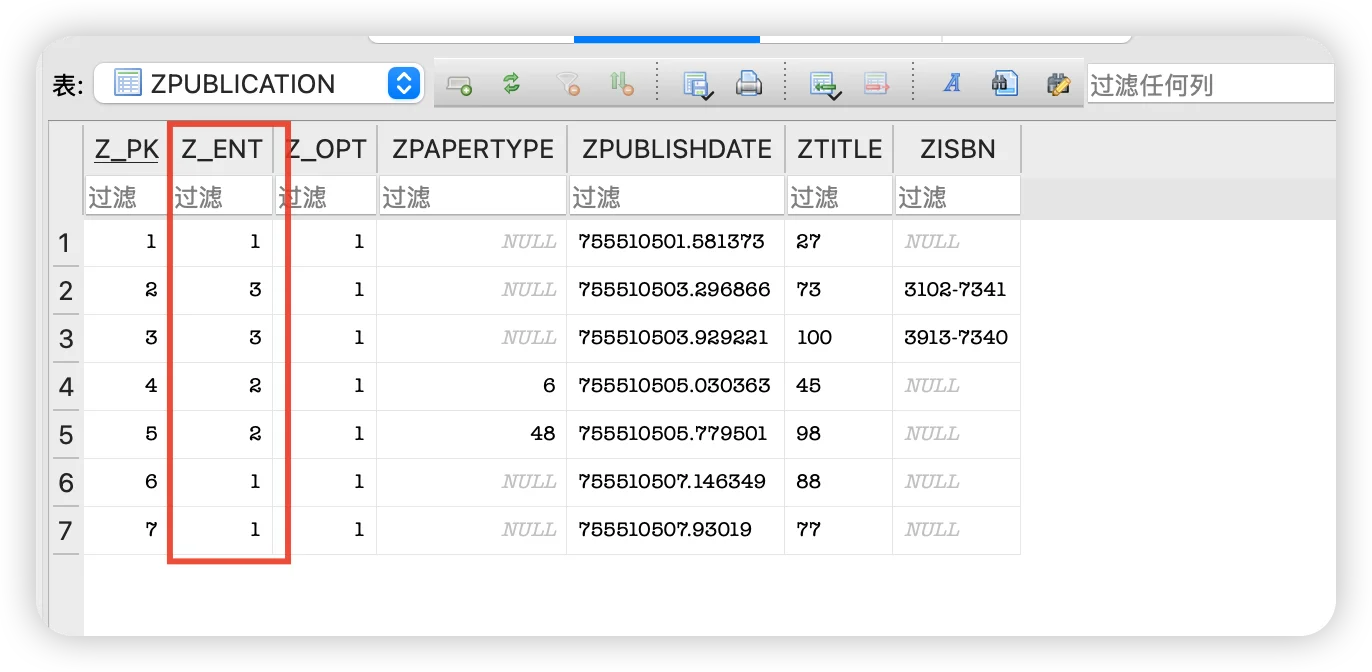
When you store a Book object in this table, all fields belonging to AcademicPaper will be set to NULL.
The primary goal of this design is to support Polymorphism: Whether you are fetching the parent entity (“Find all Publications”) or a specific child entity, Core Data only needs to scan this single table, avoiding expensive SQL JOIN operations.
Redundancy and Performance Trade-offs
Although SQLite is heavily optimized for storing NULL values (via Sparse Columns), performance issues cannot be ignored in the following scenarios:
- The Wide Table Problem: If there are many types of child entities with distinct attributes, this table will end up with a massive number of columns (a “Wide Table”). Even in the Swift 6 / iOS 26 environment, while hardware has improved, loading wide rows containing a vast number of
NULLvalues still consumes extra memory bandwidth. - Index Efficiency: Since all subclasses share a single table, the indexes can become bloated, potentially slowing down insertions and updates.
- Data Migration: Modifying the model of any single subclass (e.g., adding a property) requires touching this massive core table that holds all the data.
Conclusion and Recommendations
Do not abandon the inheritance feature entirely due to potential performance costs. For most mobile applications (data in the tens of thousands), modern device computing power can easily handle the overhead caused by this redundancy.
When to Use Inheritance:
- Subclasses share a large number of common attributes.
- You frequently need to perform polymorphic queries (e.g., displaying
BookandNewsPaperitems mixed in the same List).
When to Avoid Inheritance:
- Attributes vary drastically between subclasses, with almost no common fields.
- The data volume of one subclass is orders of magnitude larger than that of others.
- There is no need to perform unified queries across the parent type.
If you want to see exactly how Z_ENT tags this data and what these NULL values look like inside SQLite, check out my deep dive: Unveiling the Hidden Fields and Table Structure of Core Data in SQLite.
If you are struggling with whether to use inheritance, I recommend reading Model Inheritance in Core Data: Scenarios and Pitfalls for more detailed guidance.